
Getting Started - Create and Send Invoices
TABLE OF CONTENTS
Still have questions? Contact [email protected]
Create Invoice
Ready to send your first invoice? Great! Here's the simplest way to create one:
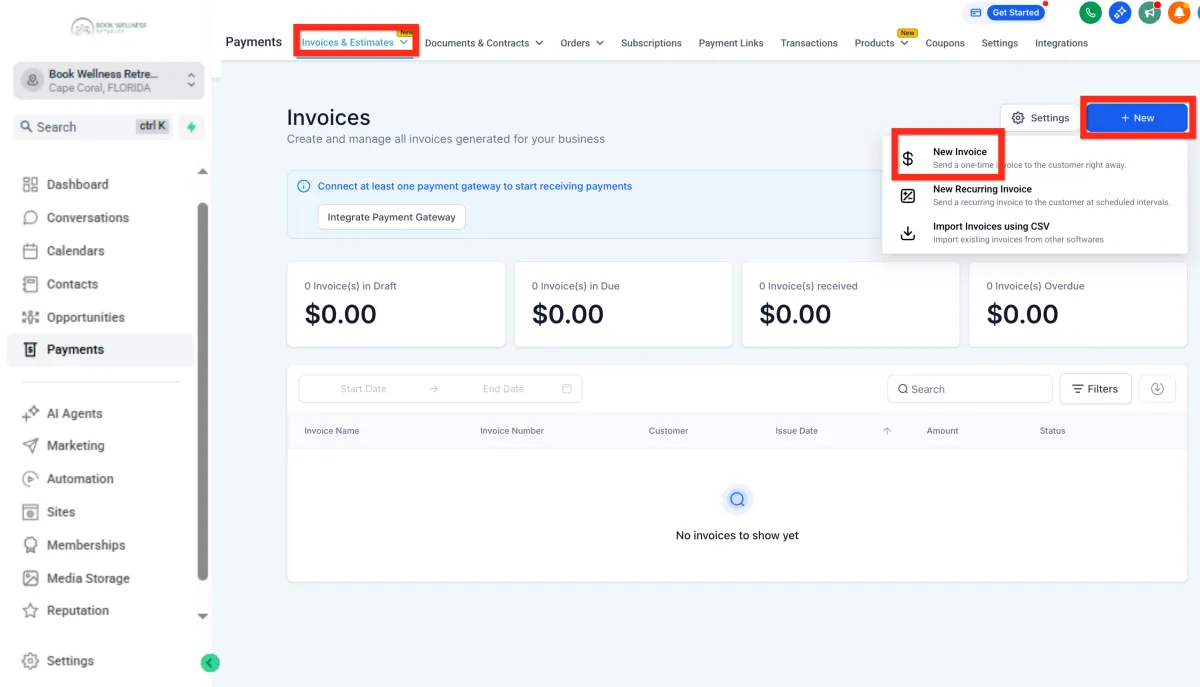
Navigate to Payments > Invoices & Estimates.
Click New > New Invoice.
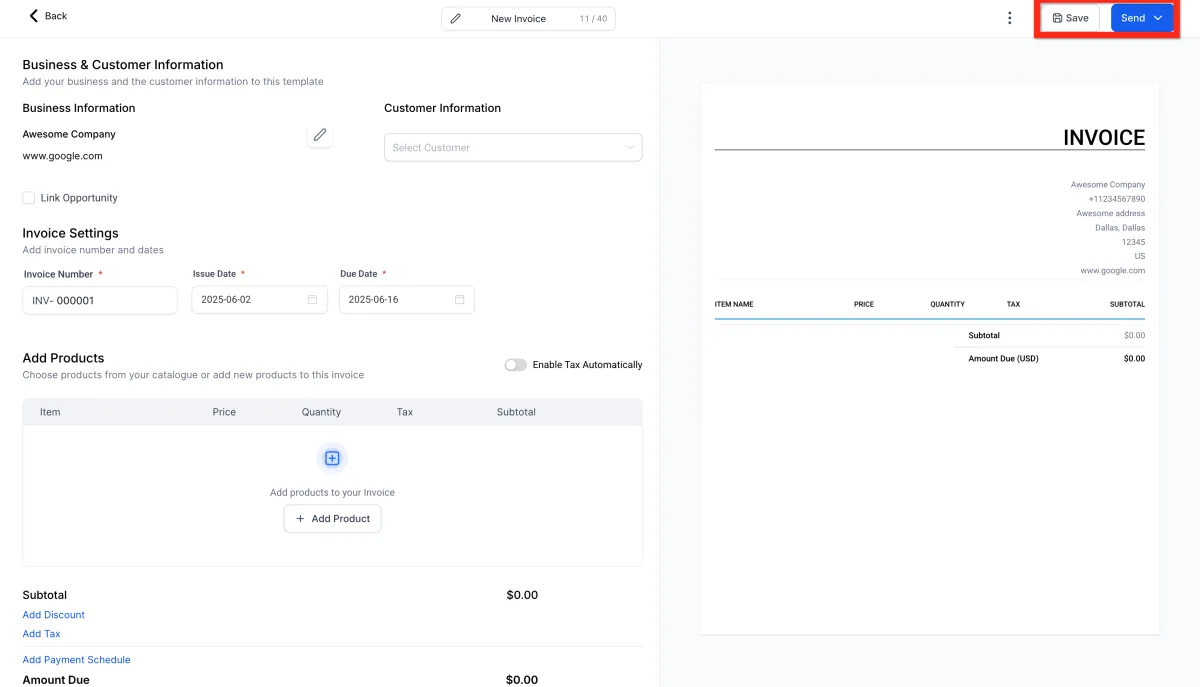
Configure your invoice with details (items, prices, customer info).
Click Save.
Finally, click Send.
Next, you can:
Explore adding payment plans to help your customers.
Set up recurring invoices for ongoing services.
Edit General Invoice Settings
Customizing your invoices makes your brand stand out and ensures clarity. Here's how to make your invoices uniquely yours:
Navigate to Payments > Invoices & Estimates.
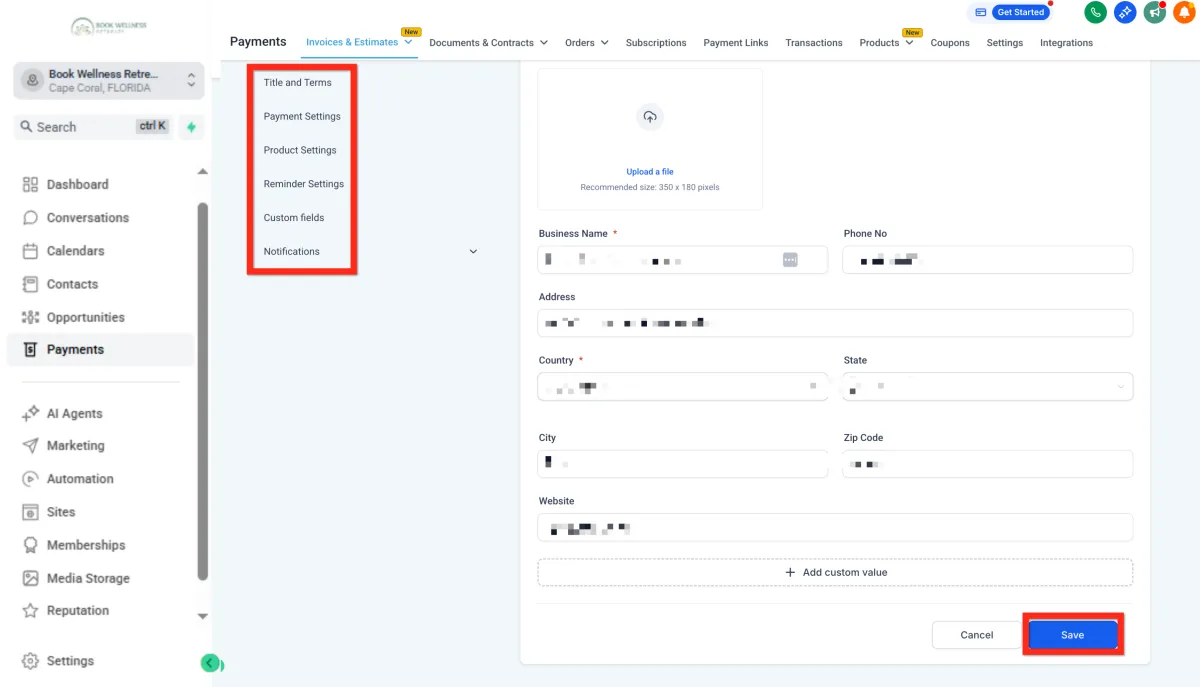
Click the Settings (gear icon).

Adjust your general settings (add your logo, company info, default payment terms).
When you're satisfied, click Save.
Next, you can:
Set up recurring invoices to streamline regular billing.
Adjust your payment schedules to manage partial payments smoothly.
Manage Invoice
Keeping track of your invoices helps you stay organized and ensures timely payments. Here's how to quickly manage your existing invoices:
Navigate to Payments > Invoices & Estimates.
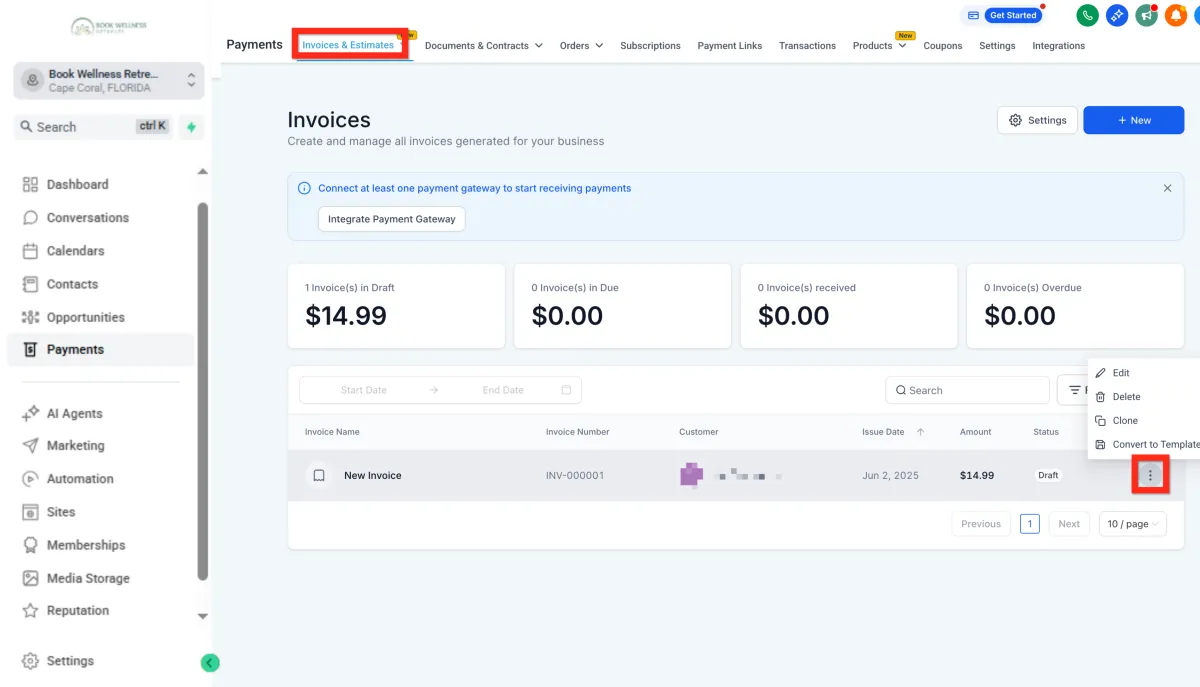
Find the invoice you're looking for in the invoice list.
Review its status (e.g., Draft, Sent, Paid).
Next, you can:
Follow up with customers directly from the invoice view.
Create new estimates or invoices based on previous ones.
Next, you can:
Q: Why is my logo missing on older invoices, but shows up on new ones?
A: Your logo is missing because the original image file was deleted from your Media Library.
Invoices pull the logo from its original file location. If you delete that file, the link breaks for all existing invoices.
How to Fix It:
For New Invoices: The system is fine; it's using the current logo from your settings.
For Unpaid Invoices: Upload a new logo to your Media Library and make sure your Business.
Details are updated with this new image. The logo will reappear on these.
For Paid Invoices: The logo cannot be fixed because paid records cannot be edited. You would have to manually add the logo to the PDF if you need to resend a receipt.
Getting Started - Create and Send Invoices
TABLE OF CONTENTS
Still have questions? Contact [email protected]
Create Invoice
Ready to send your first invoice? Great! Here's the simplest way to create one:
Navigate to Payments > Invoices & Estimates.
Click New > New Invoice.
Configure your invoice with details (items, prices, customer info).
Click Save.
Finally, click Send.
Next, you can:
Explore adding payment plans to help your customers.
Set up recurring invoices for ongoing services.
Edit General Invoice Settings
Customizing your invoices makes your brand stand out and ensures clarity. Here's how to make your invoices uniquely yours:
Navigate to Payments > Invoices & Estimates.
Click the Settings (gear icon).
Adjust your general settings (add your logo, company info, default payment terms).
When you're satisfied, click Save.
Next, you can:
Set up recurring invoices to streamline regular billing.
Adjust your payment schedules to manage partial payments smoothly.
Manage Invoice
Keeping track of your invoices helps you stay organized and ensures timely payments. Here's how to quickly manage your existing invoices:
Navigate to Payments > Invoices & Estimates.
Find the invoice you're looking for in the invoice list.
Review its status (e.g., Draft, Sent, Paid).
Next, you can:
Follow up with customers directly from the invoice view.
Create new estimates or invoices based on previous ones.
Next, you can:
Q: Why is my logo missing on older invoices, but shows up on new ones?
A: Your logo is missing because the original image file was deleted from your Media Library.
Invoices pull the logo from its original file location. If you delete that file, the link breaks for all existing invoices.
How to Fix It:
For New Invoices: The system is fine; it's using the current logo from your settings.
For Unpaid Invoices: Upload a new logo to your Media Library and make sure your Business.
Details are updated with this new image. The logo will reappear on these.
For Paid Invoices: The logo cannot be fixed because paid records cannot be edited. You would have to manually add the logo to the PDF if you need to resend a receipt.
Ready to Transform Your Wellness Business?
Join hundreds of wellness leaders who are nurturing their retreat businesses with our gentle yet powerful platform

The complete platform for wellness entrepreneurs to design, grow, and run their business with purpose.
Platform
Marketing Services
Support
Copyright © 2025. Book Wellness Retreats LLC, All rights reserved
Ready to Transform Your Wellness Business?
Join hundreds of wellness leaders who are nurturing their retreat businesses with our gentle yet powerful platform
The complete platform for wellness entrepreneurs to design, grow, and run their business with purpose.
Platform
Marketing Services
Support
Copyright © 2025. Book Wellness Retreats LLC, All rights reserved