
Getting Started - Customize Your Account Settings
TABLE OF CONTENTS
Still have questions? Contact [email protected]
What is the Business Profile?
Your Business Profile is the section of your sub-account settings where you can assign company data and configure settings that are applied across the entire sub-account. Setting up this section, and spending a few minutes configuring the settings, is critical to the way your sub-account operates.
To help you better understand all the components and elements within the Business Profile, we will be going through all the sections and settings one-by-one and explaining how to configure them and even giving you some use cases that will help you understand the outcome of each setting and configuration.
Where Do I Find the Business Profile?
Navigating to your Business Profile is quick and easy! We have also provided some screenshots below to help you find your way if you are more of a visual learner!
Make sure you are in the chosen sub-account
Click the Settings navigation item on the left side of your screen
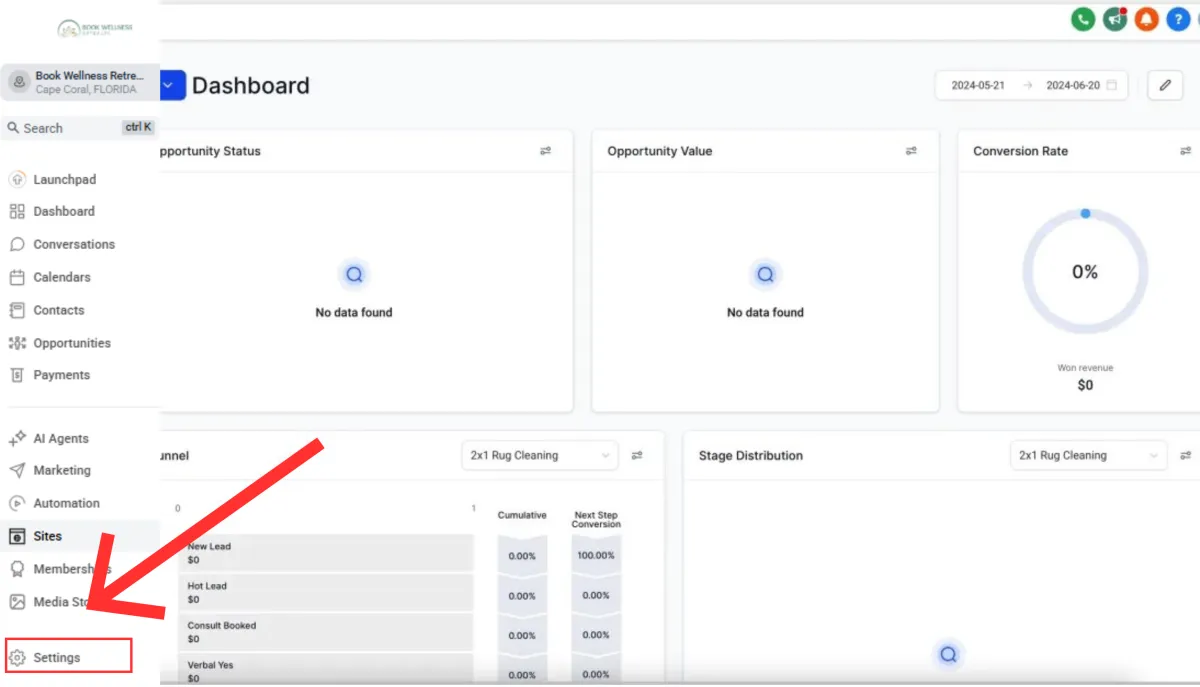
Once you are in Settings, the Business Profile will be the first navigation button in the Settings menu on the left-hand side of your screen.
The Business Profile is also the first page of settings by default, so once you click the Settings button, you will automatically see the Business Profile
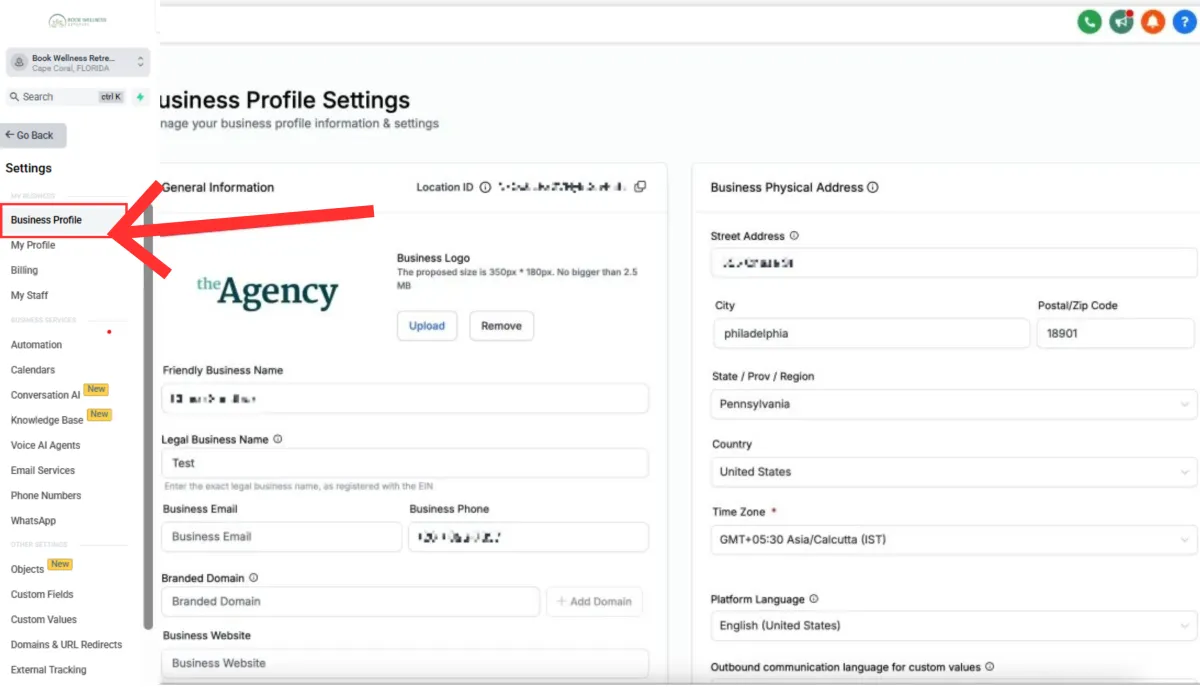
Login to MyAura -> Select a Sub-Account -> Click Settings -> Business Profile
Frequently Asked Questions
Q: Do these settings apply across all users in the sub-account?
Yes. They’re sub-account-wide, though some pages can display in a user’s personal time zone.
Q: Can I change these settings later?
Yes. These settings can be updated later in time as needed. Be sure to test any changes that are made!
Getting Started - Customize Your Account Settings
TABLE OF CONTENTS
Still have questions? Contact [email protected]
What is the Business Profile?
Your Business Profile is the section of your sub-account settings where you can assign company data and configure settings that are applied across the entire sub-account. Setting up this section, and spending a few minutes configuring the settings, is critical to the way your sub-account operates.
To help you better understand all the components and elements within the Business Profile, we will be going through all the sections and settings one-by-one and explaining how to configure them and even giving you some use cases that will help you understand the outcome of each setting and configuration.
Where Do I Find the Business Profile?
Navigating to your Business Profile is quick and easy! We have also provided some screenshots below to help you find your way if you are more of a visual learner!
Make sure you are in the chosen sub-account
Click the Settings navigation item on the left side of your screen
Once you are in Settings, the Business Profile will be the first navigation button in the Settings menu on the left-hand side of your screen.
The Business Profile is also the first page of settings by default, so once you click the Settings button, you will automatically see the Business Profile
Login to MyAura -> Select a Sub-Account -> Click Settings -> Business Profile
Frequently Asked Questions
Q: Do these settings apply across all users in the sub-account?
Yes. They’re sub-account-wide, though some pages can display in a user’s personal time zone.
Q: Can I change these settings later?
Yes. These settings can be updated later in time as needed. Be sure to test any changes that are made!
Ready to Transform Your Wellness Business?
Join hundreds of wellness leaders who are nurturing their retreat businesses with our gentle yet powerful platform

The complete platform for wellness entrepreneurs to design, grow, and run their business with purpose.
Platform
Marketing Services
Support
Copyright © 2025. Book Wellness Retreats LLC, All rights reserved
Ready to Transform Your Wellness Business?
Join hundreds of wellness leaders who are nurturing their retreat businesses with our gentle yet powerful platform
The complete platform for wellness entrepreneurs to design, grow, and run their business with purpose.
Platform
Marketing Services
Support
Copyright © 2025. Book Wellness Retreats LLC, All rights reserved